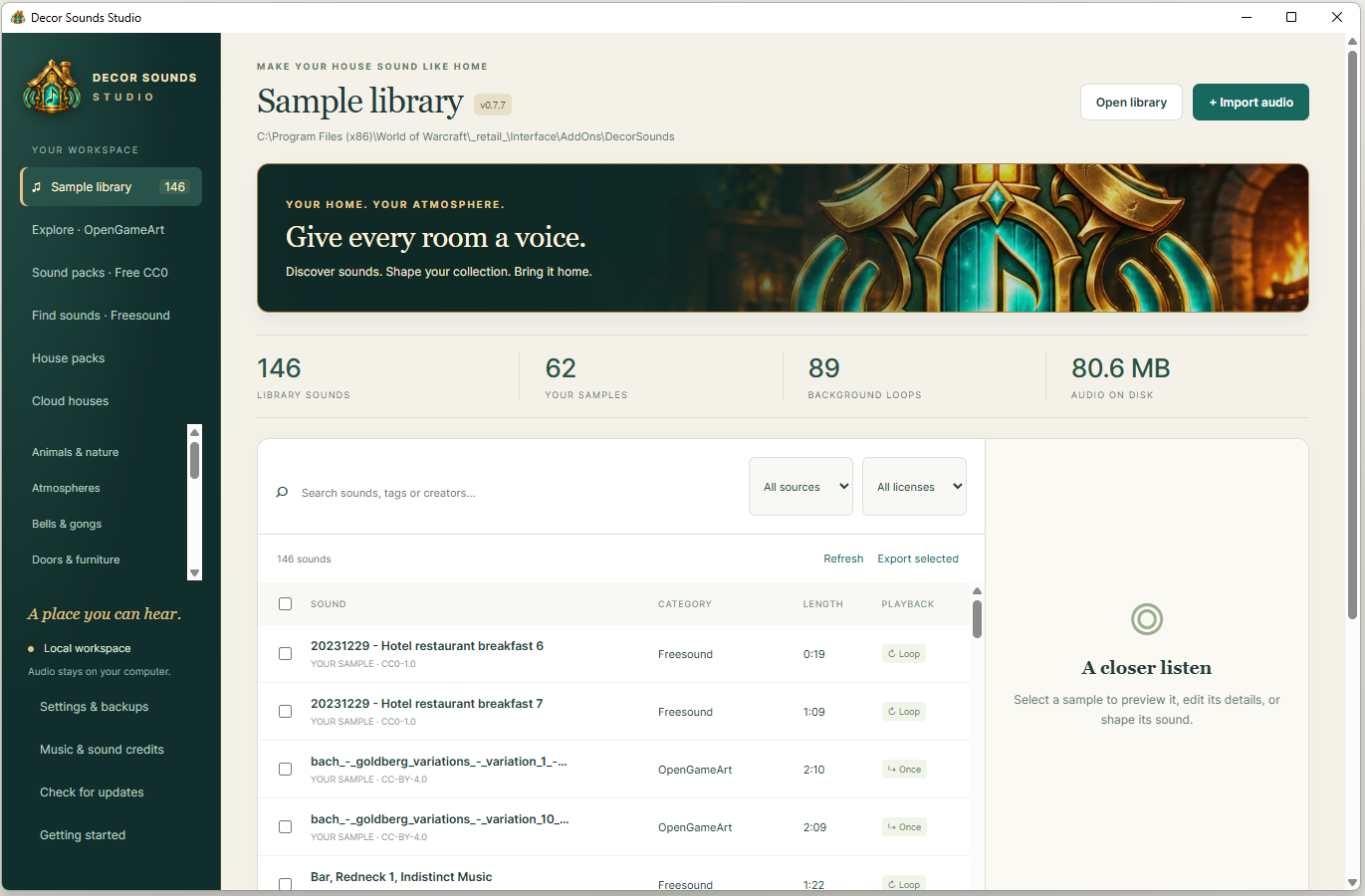
Find the perfect sounds, shape the atmosphere of your home and share your creations with visitors.
WINDOWS · 64-BIT
Decor Sounds Studio
Latest available installer: 1.0.0
From a crackling hearth to a lively tavern, bring your ideas together in one place. Discover sounds, build your collection and share the atmosphere you’ve created.
Studio 1.0.0 supports complete-house sharing and works with addon 1.0.2.
Check this download (SHA-256)0e4d435400490040f00e410061ce8547354bce08df3db4849e284dc129470fe4
Before downloading or updating, back up your library and WoW settings. Read the Download & use terms and privacy notice. Compatibility and uninterrupted operation are not guaranteed.
Rain against the windows. A bell at reception. Music in the tavern. Find and preview CC0 recordings from Freesound and OpenGameArt to suit every corner of your home.
Use Decor Sounds in WoW to give rooms their own character and place sounds around your decor. Share your finished setup for visitors to install and enjoy.
Studio runs on 64-bit Windows and connects to your installed Decor Sounds add-on. Follow the setup guide to connect your library.
Importing and converting audio requires FFmpeg and ffprobe. These are separate tools: install them, then select their folder in Studio → Settings & backups. Get FFmpeg ↗
Check this download (SHA-256)27ec3fae26263572dcbf68098f8dea252f504b294e824bb04325c65ffb0bbb00
Merge the DecorSounds folder into your existing addon installation, preserve Sounds/User and Decor Sounds – My Library, then run /reload.
Previous addon releases: 1.0.1 and 1.0.0
1.0.1 fixed new empty build naming and ensured active local builds control playback in your own house. 1.0.0 introduced complete-house sharing, clearer saved-build management, searchable house overviews and visitor setup checks.
WORLD OF WARCRAFT ADD-ON
Decor Sounds 0.7.0 — previous release
Beta
Find your sound faster, shape every room and keep your creations close.
Changes since 0.6.6, including the 0.6.7 fixes.
Choose sounds where you need them. Pick sounds directly in Rooms & backgrounds and Sound zones, with search, categories, previews, favourites and recent choices.
Name your rooms. Save room names independently from sound assignments. New selections no longer default to the crackling fireplace.
Manage builds with confidence. Clicking a saved build selects it without loading it. Loading, updating and deleting use confirmation popups. Undo the last saved-build update or restore the last deleted build.
Recover work in progress. Up to ten recovery checkpoints preserve earlier applied settings. Room and zone form drafts help retain unfinished edits when moving between rooms.
See your whole soundscape. The house overview brings rooms, backgrounds, effects, zone counts and missing sounds together. Playback explanations show what is playing and why.
Fine-tune sound zones. Duplicate a zone at your current position, see your distance from its centre and check whether you are inside it. A short exit delay reduces switching near zone boundaries.
Keep your custom collection. Support for Studio 0.7.0’s separate Decor Sounds – My Library add-on protects registered custom sounds and visitor packs when the main add-on folder is replaced.
Sound-assignment fixes from 0.6.7
Preserves sound assignments when a custom recording is temporarily unavailable or not registered.
Adds /dsounds recover to restore eligible assignments archived by an earlier update after their sounds are registered again. Edited or deleted assignments are skipped.
Add-on ZIP · 27.6 MB · Includes 84 bundled sounds.
Check this download (SHA-256)1d49e7bf82a21aa9d125ded21b0ffd8e068bf793374a580a0f6dd4b2a2ded0d5Updating? Keep your custom sounds and settings
Close WoW and back up your add-on folder and settings. For this first upgrade, merge the new DecorSounds folder into your installed copy, preserving Sounds/User.
For the separate custom library, open your installed add-on folder in Studio 0.7.0, then restart WoW. Keep Decor Sounds and Decor Sounds – My Library enabled. Do not delete the My Library folder.
Recovery checkpoints reach disk when WoW saves settings, normally on /reload or logout. Recent edits can still be lost after a crash.
Interrupted-loop recovery from 0.6.6 remains included. Game music can stay off.
WHAT CHANGED
Versions & release log
Studio and add-on versions are separate.
Explore the latest add-on improvements and available Studio installers.
Current release
Studio 1.0.0
One house. One package. One link.
Share interior and outdoor settings together in one package and cloud link.
Prepare all sound sources together, with specific repair actions.
Find recovery copies separately and search the complete house overview.
Check visitor downloads and playback readiness in Studio and WoW.
Requires addon, Studio and cloud server 1.0.0 for complete houses. Restart WoW after installing audio. In-game release testing is still required.
Download shared sounds from their original sources
Fix false audio mismatch errors when installing shared builds on another computer.
Download missing recordings from Freesound and OpenGameArt, verify the original files, then prepare OGG audio locally.
Share small packs containing source references and sound settings, with Include audio disabled.
Install Studio 0.7.18 on both computers and recreate older packs to include the source checksums.
Use with Decor Sounds 0.7.16. Cloud sharing requires the cloud 0.2.2 server patch and republishing existing builds. Close Studio before installing; restart WoW after installing new audio.
Paste your addon export into Share a build, then create a local pack or publish to the cloud.
Share official bundled recordings without replacing your in-game sound assignments.
Import complete saved builds with separate interior and outdoor sections.
Prepare quieter audio for the addon’s 25%, 50% and 75% volume controls.
Use with Decor Sounds 0.7.16. Bundled-sound cloud publishing requires the cloud 0.2.1 update. Close Studio before running the installer. Restart WoW after preparing new audio files.
Use built-in WoW sounds alongside your imported collection.
Share houses with WoW sound references; visitors play those sounds from their game installation.
Recognize WoW sounds in Studio and preview them inside the game.
Keep time-of-day schedules, Freesound and OpenGameArt imports, and your existing library.
WoW sounds require Decor Sounds 0.7.6 or later and the matching cloud update. Preview built-in sounds inside WoW. Close Studio before running the installer.
Bring a different atmosphere to morning, afternoon, evening and night: Studio now preserves the schedules you create in the add-on.
Share your scheduled house with every recording it needs, including sounds used only at certain times.
Discover optional Bach music-box and strings collections in Explore OpenGameArt.
Import supported OpenGameArt CC BY 4.0 recordings with creator credits included automatically.
Keep your existing library, cloud houses and automatic update checks.
Configure time-of-day schedules in Decor Sounds 0.7.5 or later. Cloud sharing of scheduled houses requires the matching cloud update. Close Studio before running the installer.
Studio checks for new versions when you open it, at most once a day.
An update notice shows the new version, release notes and a direct Windows installer download.
Use Check for updates in the sidebar whenever you want to check manually.
Turn automatic checks on or off in the Studio updates window.
Update checks run in the background and need no cloud account or connected sound library.
Includes the Decor Sounds branding and OpenGameArt features from previous releases.
Install 0.7.5 manually once to receive future update notices. Download the installer, finish your work and close Studio before running it. Updates are never installed automatically.
Find new sounds and music through OpenGameArt, alongside Freesound.
Explore CC0 sound packs, preview recordings and add favourites to your library.
Share cloud houses using supported CC0 OpenGameArt imports; visitors can download those sounds through Studio.
Replay recently used previews from local audio, with clearer progress messages and cancellation when choosing another sound.
Prepare older OpenGameArt imports for sharing while keeping existing sound IDs and assignments.
For OpenGameArt houses, hosts and visitors need Studio 0.7.3 or later. Initial pack downloads can take time. For older imports, use Prepare OpenGameArt sounds before publishing.
Cloud houses now loads your saved cloud setups automatically.
Added visibility, verification status, submitted/published versions, and Open, Copy share link, Install and Publish update actions.
Separated Publish a new house from the saved list and grouped account connection settings in a collapsible section.
Notes: Refresh the list to check verification status. Installation still requires local audio downloads.
Installer not available on this site yet.
Version notes
Studio 0.6.0
Import saved setups from WoW
Added Import from WoW for cloud publishing and local house-pack creation.
Added account, saved setup and house selection, with manual SavedVariables file selection as a fallback.
Added counts and warnings for rooms that are not yet mapped to the house.
Notes: Save your edits and run /reload or log out before reading the saved file. Unsubmitted forms are not included.
Installer not available on this site yet.
Install, update or uninstall
Install: download the Setup EXE for the version you want, run it and follow the installer.
Connect: open Studio, choose Open library and select your DecorSounds add-on folder. Configure the audio tools in Settings.
Update: back up first, exit Studio, run the new installer, then reopen your existing library. Review the release notes for any extra steps.
Uninstall: remove Decor Sounds Studio through Windows Installed apps. The installer preserves library data, settings, credentials and backups; remove those separately only when you intend to erase them.
If Windows flags a download, confirm its source and inspect the warning before proceeding. A matching checksum verifies that a file matches the published release; it is not a security audit or a publisher signature.
First time here?
The illustrated manual takes you from installation to your first shared house.
 DECOR SOUNDSSTUDIO